Introduction
It seems like I always choose the worst possible way to develop my programs, especially when it comes to transferring them to the circuits themselves, like in this case. A bit of context, I’ve ‘recently’ made a custom computer around the Z80 processor, capable of running CP/M and being reasonably usable, especially with the custom terminal I designed for it.
I never properly gave it a name, internally it was always called the ‘Quasar’ computer for no reason really. I think at this point I should find it a proper name, maybe… Azalea? I love flowers, not to mention it fits with the compact flash card made by a company by the name of ‘Cactus’, which is used in this system. Moreover, in Japanese 「花言葉」(hanakotoba / language of flowers) it represents patience and modesty. Which… you have to be pretty patient with this computer for any serious task. So, Azalea 8 bit computer it is!
Back to the main topic I started with, while developing this, I used to literally copy, manually move the storage to the Azalea computer and then test it. I would get physically tired, not to mention that for the longest time I couldn’t figure out whether the disk image had errors or if the bootloader was the one with the errors.
Spoiler alert, the compact flash card I used (and still use) has a defect where all odd (or even?) bytes are corrupted ONLY in 8 bit IDE mode (you can imagine I had a lot of fun tracking this down, as my computer would read the card just fine but Azalea wouldn’t) which means capacity is halved and suffering is doubled, because I must now write scripts to run the assembled binaries through, such that buffer bytes are added at the corrupted addresses to essentially skip them. Thus, the disk looks something like this in the end:
| Storing CP/M itself (<128KB) | Storing programs for CP/M (>128KB) |
|---|---|
| byte #1 | byte #1 |
| garbage | garbage |
| byte #2 | nothing useful |
| garbage | garbage |
| byte #3 | byte #2 |
I had to use both systems on the same disk, with the first 128KB being divided like the left column, and the rest like the right column. Why? Because CP/M wants its disks to be split in 128 byte sectors but the compact flash card I’m using is split in 512 byte sectors, so only one fourth of the sector can be used without sector-translating, which was a scary concept for me especially because I couldn’t even get it to work normally at first.
In any case, I recently decided to do something about this madness, because I am absolutely not developing a custom operating system with this method. I’m not even sure how I managed to get this far to be completely honest.
Enter: The emulator
To write the emulator while also finishing it within my lifetime and keeping it free of a billion bugs, I decided to look for some library to make my job easier. Very quickly, I found the following github repo, which looked like exactly what I wanted: https://github.com/redcode/Z80/tree/master
Long story short, I failed to install the library on my system at first, so I bounced a bit between other libraries before finally realizing that complicating myself with cmake for one C source file was isn’t worth it. Therefore, I went back to make and I was able to integrate the library into my project, this time properly (almost, for some reason some functions still don’t resolve but they don’t seem to be that important, at least for what I’m currently doing).
This library seems pretty well designed, and it allows some sort of devices to be added to the machine, without needing to do all the logic yourself. I’m not exactly sure how this works though, and maybe I just didn’t look far enough but the documentation feels a bit lacking. In any case, I implemented the I/O devices my way, and it ended up looking something like this:
static void machine_cpu_out(Machine *self, zuint16 port, zuint8 value)
{
	uint8_t port_low = (uint8_t)(port&0x00FF);
	uint8_t range = port_low >> 4;
	switch(range)
	{
	case 0: // Boot bit toggle
		boot_bit = !boot_bit;
		break;
	case 1: // SIO
		if((port_low == SIO_ADAT) || (port_low == SIO_BDAT)) {
			write(STDOUT_FILENO, &value, 1);
		}
		break;
	case 2: // CF card
		write_cf(port_low, value);
		break;
	case 3:
		break;
	}
}
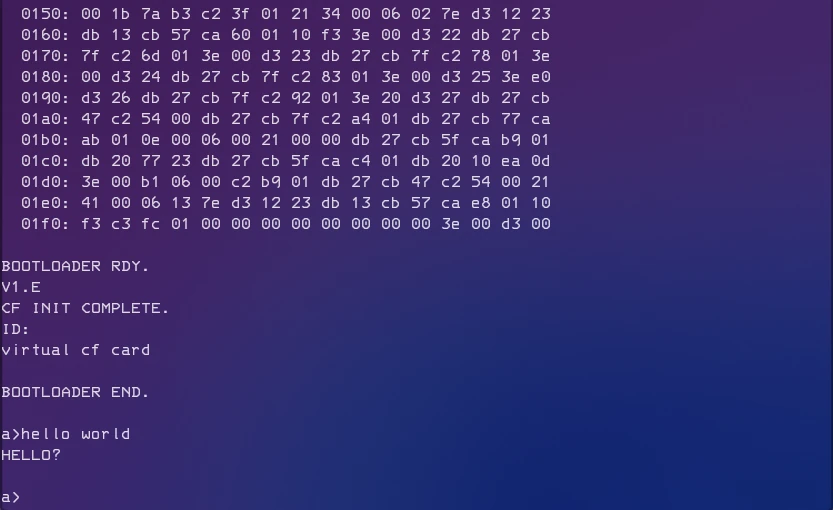
I don’t think it’s that bad is it? This function gets called anytime the processor executes an OUT instruction and attempts to send something to an I/O device. Both channels of the UART chip I’m using are mapped to stdout, which is fine for now.
You can probably notice, but no checks are in place to verify that the UART has been initialized before attempting to output a character, which means that this emulator is very easy to trick and thus very easy to make yourself believe that everything is fine when it’s not.
In any case, this is still better than nothing at all, at least now if something doesn’t work on the real hardware, I can start debugging the code dealing with I/O, instead of needing to doubt everything. (Literally everything, sometimes even my EEPROM programming tools failed me and it was not a good time)
In any case, I can’t wait to get started programming a simple operating system for this computer!
Future plans and conclusion
I want to write a simple ‘unix like’ operating system, that’s the end goal. Now I need to be very clear here, because the term ‘unix like’ is doing a lot of work here. I just want something that I’m familiar with. Familiar folder structure, commands and shell. I don’t need multitasking, memory protection or any of the other fancy features that modern OSes have. I also won’t follow the ‘Everything is a file’ philosophy either, unless it turns out to be simpler than whatever I may come up. Nothing is certain, but the direction is clear.
With that, thanks for reading!